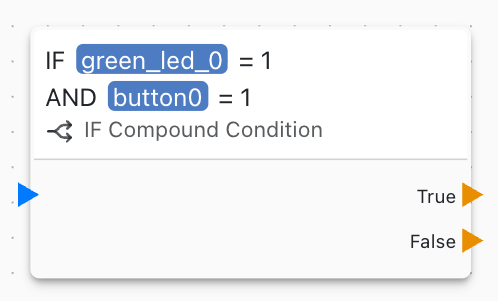
IF Compound Condition
This block evaluates complex logical conditions combining multiple comparisons. Use it for advanced decision-making with AND and OR logic.
Overview
The IF Compound Condition block evaluates complex boolean expressions with multiple conditions and logical operators, enabling sophisticated conditional logic.
Configuration
- Condition Expression: Logical formula with multiple conditions
- True Output: Path taken when condition is true
- False Output: Path taken when condition is false
Logical Operators
AND
All conditions must be true:
(temperature > 25) AND (humidity > 60)
True only if both conditions are true.
OR
At least one condition must be true:
(sensor1 > threshold) OR (sensor2 > threshold)
True if either or both conditions are true.
Comparison Operators
- Equal:
a == b - Not equal:
a != b - Greater than:
a > b - Less than:
a < b - Greater or equal:
a >= b - Less or equal:
a <= b
Complex Conditions
Combine multiple operators:
Temperature and Humidity Control
(temperature > 25 AND humidity > 70) OR
(temperature > 30)
Safety Interlock
(pressure < max_pressure) AND
(temperature < max_temp) AND
(NOT emergency_stop)
Time-Based Conditions
(hour >= 6 AND hour <= 22) AND
(weekday == true)
Range Checking
(value >= min_value) AND (value <= max_value) AND
(NOT alarm_active)
Use Cases
Common compound condition scenarios:
- Safety interlocks with multiple sensors
- Operating windows (time, temperature, etc.)
- Complex automation rules
- Multi-sensor validation
- State machine transitions
- Alert condition evaluation
Example Applications
HVAC Control
heating_needed = (temperature < setpoint - 2) AND
                  (occupied == true) AND
                  (NOT summer_mode)
Irrigation System
water_needed = (soil_moisture < threshold) AND
                (rain_detected == false) AND
                (hour >= 6 AND hour <= 9) OR
                (hour >= 18 AND hour <= 21)
Security System
trigger_alarm = (motion_detected == true) AND
                 (armed == true) AND
                 (NOT authorized_code)
Tank Overflow Prevention
stop_fill = (level > high_level) OR
             (flow_rate > max_flow) OR
             (emergency_stop == true)
Truth Tables
Understand logic operators:
AND Truth Table
| A | B | A AND B |
|---|---|---|
| F | F | F |
| F | T | F |
| T | F | F |
| T | T | T |
OR Truth Table
| A | B | A OR B |
|---|---|---|
| F | F | F |
| F | T | T |
| T | F | T |
| T | T | T |
Optimization
Optimize complex conditions:
Short-Circuit Evaluation
Place most likely false condition first in AND Place most likely true condition first in OR
Simplification
Simplify complex expressions:
Before: (a AND b) OR (a AND c)
After: a AND (b OR c)
Debugging
Debug complex conditions:
- Test each subcondition separately
- Use Debug Print to show values
- Verify operator precedence
- Test all logic paths
- Check edge cases
Related Blocks
- Comparison: Simple comparisons
- Compound Math: Complex calculations
- Variable Set: Store condition results
Best Practices
Compound condition best practices:
- Use parentheses for clarity
- Keep expressions readable
- Comment complex logic
- Test all combinations
- Avoid overly complex expressions
- Break into multiple blocks if needed
- Use meaningful variable names
Alternative Approaches
For very complex logic:
- Use multiple simpler condition blocks
- Implement state machine
- Create lookup table
- Use separate validation blocks
Performance
Condition evaluation:
- Very fast execution
- Efficient short-circuit evaluation
- Minimal overhead
- Suitable for real-time control
Validation
Validate conditions:
- Test boundary values
- Verify all logic paths
- Check for contradictions
- Ensure fail-safe behavior
Documentation
Document complex conditions:
// HVAC operating window:
// - Temperature between 18-26°C
// - Humidity below 70%
// - Occupied hours (6AM-10PM)
// - Not in maintenance mode
(temperature >= 18 AND temperature <= 26) AND
(humidity < 70) AND
(hour >= 6 AND hour <= 22) AND
(NOT maintenance_mode)
Error Handling
Handle condition errors:
- Undefined variables: Set defaults
- Invalid comparisons: Validate data types
- Null values: Check before comparison